

Hi, I was provided a code for my lighting system by a member of this forum. It worked, for one light. Then when trying to do it again, the lights would automatically turn red with no input on my end. I have 6 fixtures with 7 channels each, I have checked the DMX addresses for overlapping, looked in the software for changes, and even read the manual. I don't have any control over the red and I no longer can control the first fixture, any suggestions? Thanks so much; I can provide more information upon request.

DMX help with lighting fixtures (no control)
-
tpheron -
May 18, 2022 at 3:41 AM -
Thread is Resolved
We proudly present: The release of DMXControl 3.3.3!
On September 29, 2026, we held our release show for DMXControl 3.3.3. During our usual “hour-long” session, we showed you all the new features in this version and what it now has to offer.
Read all about it in the corresponding news article: We proudly present: The release of DMXControl 3.3.3!
-
-
Hi,
can you please attach your DMXControl project? Then we can look at it and see, if we find any things, that have to be fixed to work properly

JP
-
Here you go, tTest Project.zipTest Project.zipTest Project.ziphank you so much! I really appreciate it!
Each light has 7 channels, brightness, red, green, blue, strobe, color fade, speed.
I also have provided the code bellow.XML
Display More<?xml version="1.0" encoding="UTF-8"?> <device image="IMG.png" type="DMXDevice" dmxaddresscount="7" DefaultDisplayStyle="PREVIEW" dmxcversion="3.1.0" ddfversion="1.0.0"> <information> <model>Par Lights 36 LED</model> <vendor>LUNSY</vendor> <author>Helmut</author> <mode>7 Channel</mode> </information> <functions> <dimmer dmxchannel="0"/> <strobe dmxchannel="4"> <range type="linear" mindmx="0" maxdmx="255" minval="0" maxval="10"/> </strobe> <rawstep dmxchannel="5" name="Mode"> <step caption="Off" mindmx="0" maxdmx="50"/> <step caption="Color Step" mindmx="51" maxdmx="100"/> <step caption="Color Fade" mindmx="101" maxdmx="150"/> <step caption="Color Fade In/Out" mindmx="151" maxdmx="200"/> <step caption="Music Mode" mindmx="200" maxdmx="255"/> </rawstep> <raw dmxchannel="6" name="Mode Speed"> <range type="linear" mindmx="0" maxdmx="255" minval="0" maxval="100"/> </raw> <rgb> <red dmxchannel="1"/> <green dmxchannel="2"/> <blue dmxchannel="3"/> </rgb> </functions> </device> -
Hey, I'm still having the same issue, not sure if anyone has looked at the file but if so, that would be great!
-
did you assign the correct addresses to your devices? According to your project 1.
1st device DMX channel 1.
2 device DMX channel 17,
3 device DMX channel 33,
4 device DMX channel 49,
5 device DMX channel 65
and device 6 on channel 81
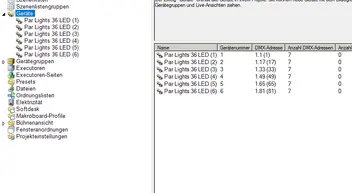
do you have the correct DMX cables to connect the devices?
-
I made sure all of the channels marched up with the program. When using my DMX board that I have, I can control all of the lights fine with no issue.
I wonder if it has to do with the code I was provided? I wouldn't know why it suddenly stopped working and doesn't work on any other light though.
I will keep trying though, thanks for the tip.
-
Newly created posts will remain inaccessible for others until approved by a moderator. The last reply was more than 365 days ago, this thread is most likely obsolete. It is recommended to create a new thread instead.


