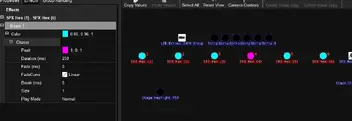
Cascade chase effect

We proudly present: The release of DMXControl 3.3.3!


On September 29, 2026, we held our release show for DMXControl 3.3.3. During our usual “hour-long” session, we showed you all the new features in this version and what it now has to offer.
Read all about it in the corresponding news article: We proudly present: The release of DMXControl 3.3.3!


  • Hi everyone,

    I'm trying to create a 'cascade' colour chase across LED parcans, and was wondering if there is a way to do this using Effects rather than cue lists?

    See attached image for a visual demonstration of what I'm trying to achieve.

    Any help much appreciated!

    If it's not currently possible, can I suggest this would be a useful feature to have in a future version? I would imagine it would work as an extension of the Colour Chaser, with a Play Mode of "Cascade".

    Cheers,

    Phil

  • Hello Phil!

    You can and only need use the „simple“ Chaser by putting them on „Color“. There you can choose for the parameter „peak“ your second colour - in your example the light blue. The magenta you set directly in the color property.

    Does it work with this advice already? If not, don’t hesitate to ask again. :)

    Regards, Stefan.

  • Hi,

    there is a way to create this effect. However, it is one of the uglier ones, because there is currently no way to generate this effect on a direct way (as a sub-function of one of the existing effects). But you can get this effect by using the "PWM Static" effect, a ParameterMaster and a dummy device. For this, add a new generic dimmer first. This is our "controller device". Set its start address to some value, that doesn't bother you. Then open the Input Assignment and add a new connection set. In it, add a new DMXCMixer node (by right-clicking => Add => Wrapper => DMXCMixer). In its properties, select the generic dimmer and confirm with OK. Then add a Rule of Three (in the logic section of the context menu) and set its input max to 100 (because this is the maximum value, the DMXCMixer gives us at the intensity output). Maybe, you have to set the input min to 4 or 5 to have the final effect correct, but you can adjust this later, too. Last, add a ParameterMaster node and select the "ParameterMaster 1" in the Properties. Connect the "Intensity" output port of the DMXCMixer with the Rule of Three and from there connect the "Fader Value" Input port of the ParameterMaster node. You can find the resulting connection set in the following screenshot.

    Why do we need this connection? We can now control the value of the ParameterMaster 1 with the intensity of the dummy device. Now we can setup the resulting effect. Add the "PWM Static" effect to the color property of your fixtures. You will notice, that the ParameterMaster 1 is already entered as parameter for the "Deflection" of the PWM Static effect. Set the "Fade" to "False", the "Direction" to "<" and the "Peak" to the color of your choice. Set the main color parameter of your devices to the second color. Now, we came to the fun part. By changing the intensity of the dummy device, we can control the position of the separation between the two colors. So you can e.g. add a triangle effect and should now get your effect. With other effects on the Intensity property, you get other transitions.

    I hope, this short description is understandable :) If not, just ask again.

    Regards

    JP

    im Falle eines Falles klebt Gaffa einfach alles, denn Gaffa ist dein Freund und Helfer :thumbup:

    Edited once, last by JPK (February 13, 2022 at 6:09 PM).

  • Thank you Stefan and JP for your replies.

    Stefan - I hadn't considered using the simple chaser effect on the colour attribute before! It doesn't quite achieve what I need because it's a chase rather than a cascade effect, but it's useful to know anyway!

    JP - thank you for the workaround. I've not used the node-based input assignment system in DMXC yet, so this will be a good opportunity to learn :)

    I'll try it out and let you know how I get on.

    Thanks again,

    Phil

  • You are welcome... after rethinking about your question, there is maybe another way to reach your goal.

    You create a cuelist with two cues. In the first, your color is full magenta and in the second one, the color is full light blue. As trigger for both cues you choose for example "follow". In the column for delay, you type in for example 0 > 1s. When your cuelist runs in the loop mode, you should have maybe also your needed result?

  • I think I over-simplified the description of what I want to achieve :)

    JP - your solution does achieve exactly what I described in my original message.

    However, what I really want is to be able to cascade 2 or more colours across a row of devices repeatedly.

    Stefan, your cuelist solution works nicely.

    It would be great if a cascade effect like this could be incorporated in a future version of DMXC so that it could be achieved without using cuelists.

    I've made a video demonstrating the effect here for reference:

    External Content vimeo.com
    Content embedded from external sources will not be displayed without your consent.
    Through the activation of external content, you agree that personal data may be transferred to third party platforms. We have provided more information on this in our privacy policy.

    I think it would make sense to have this as an extension of the Colour Chaser effect with 'cascade' as a play mode.

    Thanks again for your help guys.

  • Ok, Stefans way to achieve it works well as long as only two colors are visible at the same time. While testing his solution with a wait trigger, I found a little bug.

    Regardless of this fact, it would be good to have an effect like you described in your last post. However, instead of a "cascade" play mode, a "fill" option in the chasers is maybe a better way due to the fact that this could then be used with all play modes :). If you want you can add a ticket in our bug tracker (https://bugs.dmxcontrol-projects.org/) for your feature request. Despite the fact that the overall UI of the bugtracker is in German you can report bugs and feature requests in English too :) Then this idea / feature request does not get lost in the mass of posts here in the forum.

    im Falle eines Falles klebt Gaffa einfach alles, denn Gaffa ist dein Freund und Helfer :thumbup:

    Edited once, last by JPK (February 14, 2022 at 10:01 AM).

  • Newly created posts will remain inaccessible for others until approved by a moderator. The last reply was more than 365 days ago, this thread is most likely obsolete. It is recommended to create a new thread instead.